
What Happens to Each Part of a Laptop When It Gets Recycled?
Most people hand over an old laptop without much thought about what happens next. The truth is, a laptop isn't a single thing — it's a collection of a dozen or more distinct components, each made of different materials, each with a different end-of-life path. Some get recovered and resold. Some get shredded for raw materials. And some — especially anything that stored data — need to be destroyed before anything else happens. Here's a component-by-component breakdown.
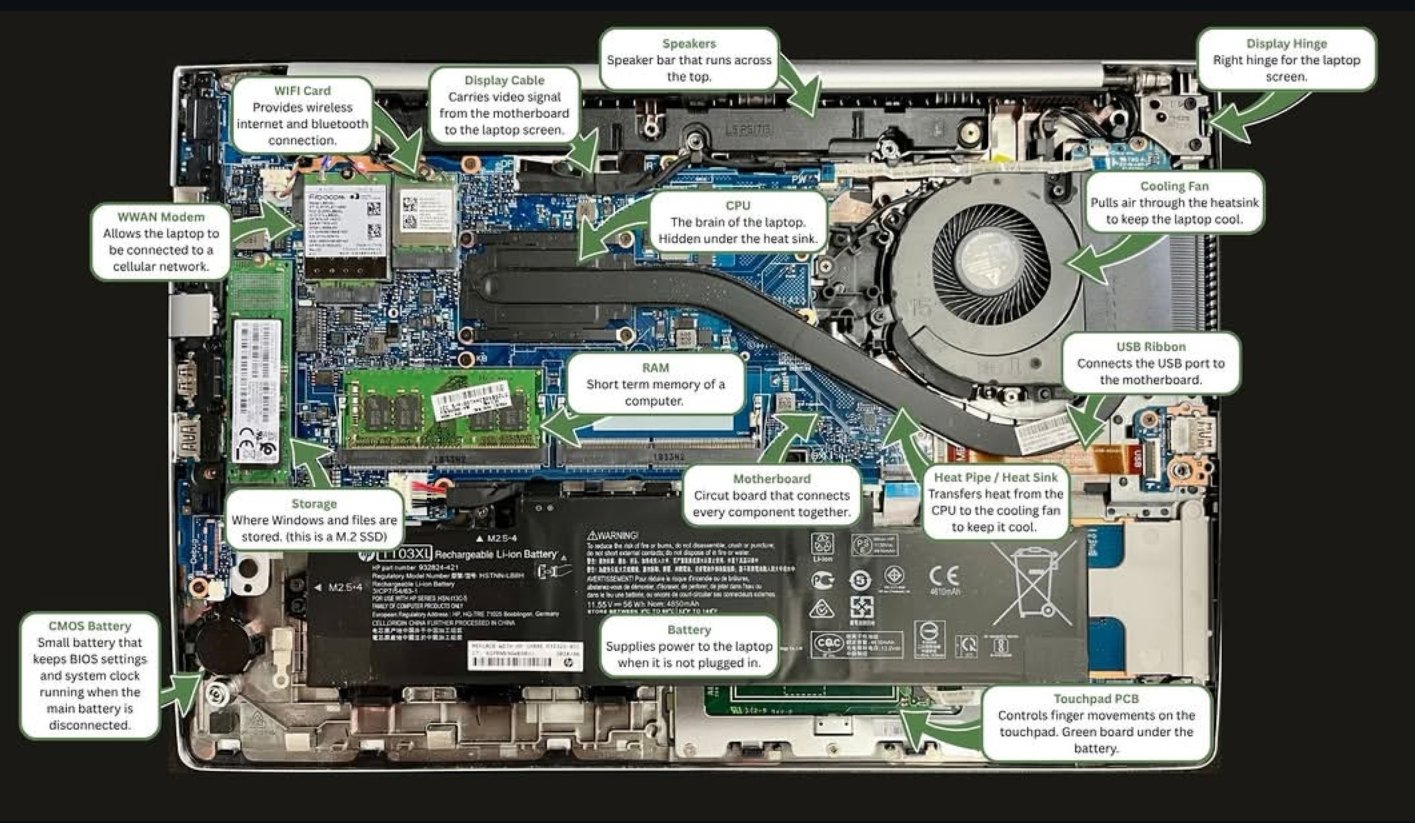
The inside of a disassembled HP laptop, with key components labeled. Each part follows a different path when the laptop is recycled.
The components — what they are and what happens to them
Storage (M.2 SSD)
What it is: The storage drive is where your operating system, files, documents, photos, and applications live. This particular laptop uses an M.2 SSD — a compact, high-speed solid-state drive. Older laptops used 2.5" SATA drives or traditional spinning hard drives (HDDs).
What happens to it: This is the most critical component in any laptop from a data security standpoint. Before anything else happens to the laptop, the storage drive must be destroyed. At EverTech, SSDs are physically shredded using industrial equipment — this is because SSDs use flash memory architecture that can make software-only erasure unreliable. Every drive is logged by serial number, shredded, and documented with a Certificate of Destruction. The shredded material — primarily aluminum, silicon, and trace metals — goes to downstream processors for material recovery.
Motherboard
What it is: The motherboard is the central circuit board that connects every other component together. It routes power, data, and signals between the CPU, RAM, storage, and every port on the laptop. Without it, none of the other parts can communicate.
What happens to it: Motherboards are one of the most materials-rich components in a laptop. They contain copper (in the circuit traces), gold (in connector contacts), silver, palladium, and small amounts of other valuable metals embedded in their layers. At a certified recycling facility, motherboards are processed by specialized e-waste smelters and refiners who recover these precious metals. The fiberglass substrate is also recovered as a secondary material. Motherboards in good condition from newer laptops may be evaluated for component harvesting before processing.
CPU (Central Processing Unit)
What it is: The CPU is the brain of the laptop — it processes every instruction the computer runs. It sits hidden under the heat sink and cooling system. In most modern laptops, the CPU is soldered directly to the motherboard rather than socketed, which means it typically gets processed with the board.
What happens to it: CPUs contain significant concentrations of gold, silver, copper, and palladium relative to their size — more so than almost any other component. Socketed CPUs (more common in older laptops) may be removed and sold individually to refurbishers or component resellers if they have remaining value. Soldered CPUs are recovered through the motherboard processing stream. The precious metal content in CPUs is why responsible recycling matters — these materials are genuinely recoverable and have real market value.
RAM (Random Access Memory)
What it is: RAM is the short-term memory of a computer — it holds the data the CPU is actively working with right now. More RAM means a computer can run more programs at once without slowing down. RAM is typically installed in removable sticks, making it one of the easiest components to upgrade or remove.
What happens to it: RAM sticks are one of the highest-value recoverable components in a used laptop. If the RAM is in working condition and the laptop is recent enough, the sticks are removed, tested, and resold into the secondary market — they're compatible across many machines and in consistent demand. RAM that's too old or failing gets shredded with the motherboard for precious metal recovery. RAM does not retain data after power is removed, so it doesn't require the same destruction process as storage drives.
Battery
What it is: The lithium-ion battery supplies power to the laptop when it's not plugged in. Modern laptop batteries are typically sealed packs (like the HP HT03XL shown here) rather than removable cells, and they're one of the most carefully regulated components in electronics recycling.
What happens to it: Lithium-ion batteries cannot go into standard recycling streams — they're a fire hazard if punctured or crushed improperly, and they require dedicated processing. At certified facilities, laptop batteries are discharged, sorted by chemistry, and sent to battery recyclers who recover lithium, cobalt, nickel, and manganese. These recovered materials are valuable inputs for new battery manufacturing. Battery recycling is one area where the circular economy is genuinely working — the materials from your old laptop battery can end up in a new EV battery.
CMOS Battery
What it is: The CMOS battery is a small coin cell (usually a CR2032) that keeps the BIOS settings and system clock running even when the laptop is powered off and the main battery is disconnected. It's the reason your laptop still knows what time it is after sitting unused for weeks.
What happens to it: CMOS batteries are removed separately before processing. As small lithium cells, they go into the battery recycling stream. They're tiny but hazardous if landfilled — the lithium and heavy metals inside require proper handling.
WiFi Card & WWAN Modem
What it is: The WiFi card handles wireless internet and Bluetooth connectivity. The WWAN modem (when present) allows the laptop to connect to cellular networks — the same way a phone connects to LTE or 5G. Both are typically small M.2 cards plugged into the motherboard.
What happens to it: Newer WiFi 6 and 6E cards have some secondary market value and may be pulled for resale. Older cards go into the motherboard processing stream for precious metal recovery. WWAN modems are removed and processed similarly — they contain similar materials to WiFi cards but may also have SIM card slots that need to be cleared of any stored data.
Cooling Fan & Heat Pipe / Heat Sink
What it is: The cooling system is a two-part assembly: the heat pipe draws heat away from the CPU and transfers it to the heat sink, and the fan pulls air through the heat sink fins to dissipate it. Without this system, the CPU would overheat within seconds of running at full load.
What happens to it: Cooling fans are primarily aluminum and copper — both highly recyclable metals. Working fans from newer laptops may be tested and resold as replacement parts. Heat pipes and heat sinks go into the metals recovery stream, where aluminum and copper are separated and melted down for reuse. These are some of the simpler components to recycle — no hazardous materials, high metal content, good recovery value.
Display Cable & USB Ribbon
What it is: The display cable carries video signal from the motherboard to the laptop screen. The USB ribbon connects the USB ports to the motherboard. Both are flexible flat cables — thin, delicate, and model-specific.
What happens to it: These cables are too model-specific to have broad resale value and too small to process individually. They're bundled with other cable and wire materials for copper recovery. The copper content in laptop cabling is modest but worth recovering at scale — cable processors shred and separate the copper from the insulation using granulation.
Speakers
What it is: Laptop speakers are typically a pair of small drivers mounted near the top of the chassis. They're usually connected by thin wire leads to the motherboard's audio output.
What happens to it: Laptop speakers have minimal resale value and are processed as mixed materials — small magnets, copper wire, and plastic housings are separated in the shredding and sorting process. The rare earth elements in speaker magnets (neodymium in particular) are theoretically recoverable but rarely separated at this scale in current recycling infrastructure.
Display Hinge
What it is: The display hinge connects the screen assembly to the laptop base and allows the lid to open and close. It's a precision mechanical component — typically steel or aluminum with internal friction mechanisms.
What happens to it: Hinges are steel or aluminum and go into the metals recovery stream. Some hinges from common laptop models have aftermarket demand as replacement parts — a broken hinge is a common repair — so they may be pulled and resold before the laptop is broken down further.
Touchpad PCB
What it is: The touchpad PCB (printed circuit board) is the green board under the battery that controls the touchpad — it translates finger movements and gestures into cursor movements and clicks.
What happens to it: Touchpad PCBs are small circuit boards processed similarly to the motherboard — precious metal recovery via the e-waste smelting stream. They don't contain user data and don't require special handling beyond standard e-waste processing.
Laptop Chassis (The Shell)
What it is: The chassis is the physical body of the laptop — the top lid, bottom panel, and keyboard deck. Most modern laptop chassis are aluminum, magnesium alloy, or ABS plastic, depending on the tier of the machine.
What happens to it: Aluminum chassis are shredded and melted for aluminum recovery — aluminum is one of the most efficiently recycled materials in existence, requiring only about 5% of the energy needed to produce it from raw ore. Plastic chassis are sorted by resin type where possible and processed for plastic recovery, though the economics of plastic recycling from electronics are more variable than metals.
Everything above describes what happens after data is handled. But before any component gets resold, shredded, or melted down, the storage drive has to be destroyed. Every other step in laptop recycling is downstream of that. If you're recycling a laptop that was used for work, that step isn't optional — it's the whole point. See how we handle data destruction.
What materials are actually recovered
Taken together, the components in a single laptop represent a meaningful concentration of recoverable materials:
None of these materials disappear when a laptop breaks or becomes obsolete. They're either recovered through responsible recycling — or they're lost to landfill, where the hazardous elements (lead, cadmium, mercury in older components) leach into soil and groundwater. The difference between those two outcomes is whether the laptop ends up at a certified recycler or in a trash bin.
R2 (Responsible Recycling) certification is the industry standard for electronics recyclers. It requires documented downstream accountability — meaning the recycler has to verify where materials go after they leave the facility, not just hand them off and hope. EverTech uses R2-certified downstream processors for all materials recovered from the equipment we handle.
Ready to recycle a laptop — or a hundred?
Whether you're a business retiring a fleet of devices or an individual with a single old laptop, EverTech handles secure electronics recycling and certified data destruction for businesses across Greater Boston. We pick up, we document, we destroy what needs to be destroyed, and we recycle the rest responsibly.
Need to recycle laptops or other electronics in Greater Boston?
We handle pickup, secure data destruction, and responsible recycling for businesses of all sizes — with full documentation every step of the way.